Hours back in your week
Replace repetitive clicks, report hopping, and spreadsheet cleanup with one focused operational workflow.
 TOOLS FOR NETWORK OPERATORSNOT · NAP · PC Scanner
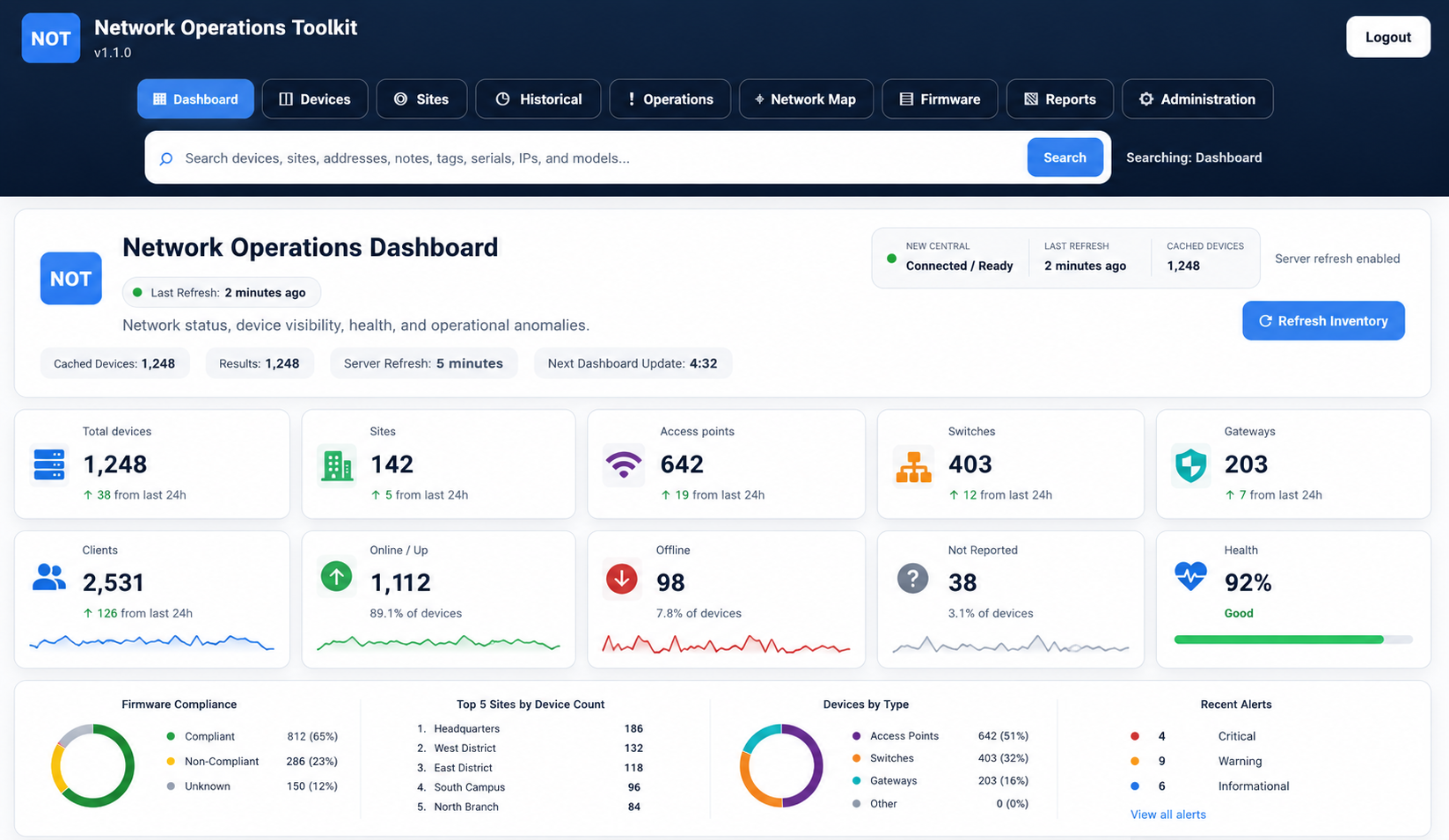
Turn network inventory into faster answers with NOT. Map every site and its current status with NAP. Give your team clear, shared visibility without adding another hosted platform. Aruba Central integration is supported.
Search, troubleshoot, and report on your Aruba Central network.
Explore NOT NAPSee site locations, equipment and collected health status together on one map.
Explore NAP & download Free bonus toolPC ScannerFind responsive Windows PCs and collect practical inventory from one simple desktop tool.
Download freeAVAILABLE NOW — SECURE DOCKER DELIVERY
NOT turns scattered network data into fast, precise searches and clear operational views—so your team spends less time hunting, clicking, and cleaning up reports, and more time running the network.
From $19/month. Your license and secure Docker download instructions arrive automatically after confirmed payment.
BUILT FOR TEAMS MANAGING
NOT Network Operations Toolkit is an independent companion for your networking platform—built to help operators move from platform data to the answers, reports, and follow-through their day demands.
Operational modules are read-only. Write-capable tools live only in the Administration module, where role-based access lets you decide exactly who can use them.
Choose a NOT plan →NOT reduces the time between a question and a useful answer. Search across your Aruba estate with more precision, see related context together, compare sites quickly, and export clean results without retracing the same path in multiple views.
Replace repetitive clicks, report hopping, and spreadsheet cleanup with one focused operational workflow.
Search across devices, clients, IP addresses, MAC addresses, serial numbers, sites, and groups from one place.
Move from a partial identifier to the right switch, access point, gateway, or client context with fewer steps.
Turn live Aruba Central data into clean operational and leadership-ready reports without rebuilding the data by hand.
Multiple operators can monitor the same installation at the same time, using their own accounts. Compare locations and investigate issues together.
Deploy with Docker and follow the guided onboarding process—without building a Python environment or installing dependencies by hand.
Start free with Community, then move to a predictable monthly plan as the network grows. Every plan includes unlimited NOT user accounts, secure Docker delivery, and access to the complete production release.
One license per installation, with unlimited user accounts.
Licenses check in periodically. Customers receive a 14-day offline grace period and a separate 14-day period to move to the correct tier after exceeding their licensed device count.
Yes. The Windows PowerShell scanner is a free local download with no subscription or license key. It does not upload inventory to NOT Networks. Use it only on networks and computers you are authorized to scan.
No. NOT Network Operations Toolkit is an independent product from NOT Networks and is not endorsed by or affiliated with Hewlett Packard Enterprise or HPE Aruba Networking.
Network engineers, Aruba Central administrators, MSP teams, school districts, healthcare organizations, government teams, and other multi-site operators.
Operational modules use read-only Aruba Central access. Write-capable tools are limited to the Administration module, where access can be restricted to authorized administrators through role-based permissions.
Docker, an active NOT license, and Aruba Central API credentials with appropriate read access. The installer includes a guided onboarding wizard and customer documentation.
Yes. Choose a paid NOT plan, complete secure checkout, and receive your matching license and download instructions automatically by email. Existing customers can go straight to the download portal.
NOT and NAP are licensed by device count, with unlimited user accounts and one installation per license. Each product has its own license and Docker download.
Yes. Team members can use separate accounts in the same installation at the same time. For access from other computers, configure secure HTTPS access to your Docker host and assign appropriate user permissions.
Yes. Once Aruba Central is connected, NAP schedules status updates every five minutes. Full inventory sync runs on a separate schedule or when an administrator starts it. API availability, permissions and rate limits affect how current the map is.
Put every physical site in context. NAP brings locations, equipment and collected network status into a searchable map, so you can find the affected site and start investigating without juggling spreadsheets.
Run it on your own Docker host and let multiple team members monitor the same workspace at once. Connect your API and you are ready to go. OpenFreeMap supplies the street basemap without a customer API key.
NAP checks Aruba Central status on a five-minute schedule, helping your team spot warning signs before an end-user report becomes your first clue. Detection timing depends on the source API.
One license per installation, with unlimited user accounts.
After confirmed payment, your license and private download instructions are emailed automatically. Install Docker, start NAP, and activate your license. The OpenFreeMap basemap needs no API key, and status updates run automatically after your data provider is connected.
As a bonus for network operators, this local PowerShell tool scans an authorized IPv4 range and collects hostname, serial number, logged-on user, RAM, CPU, OS, manufacturer and model from responsive Windows computers.
SHA-256 83858fc873eee32076d295b21316e8c3470c1a4b10136122a2f151b34370dc3f
01Set your rangeStart and end IPv4 addresses
02Discover live PCsFast parallel ping discovery
03Collect inventoryWindows CIM using your credentials
04Export the resultCSV always, or Excel when available